Common Mistakes to Avoid in Responsive WordPress Web Design
A theme can make or break a site. Some themes are packed with features and third-party libraries that increase loading times; to find an ideal one that adheres to web coding standards while remaining lightweight is ideal. Here’s what can make a lot of difference: Utilize a responsive layout and switch to the WebP image format. The difficult part is: responsive design elements. That is why we have prepared a complete guide on common mistakes to avoid in responsive wordpress web design. Keep reading!
Slow Load Times
A slow-loading website can turn visitors off your site and have an adverse effect on search engine rankings. Why? There are lots of your competitors with faster loading speed, and Google only prefers someone with better user engagement. So, yeah. Loading speed can break or make your website.
WordPress websites often load slowly due to multiple causes, including:
- large image files
- CDN Network
- Unresponsiveness for mobile devices
- JavaScript Files
- Cache
- Excessive Plugins, especially those that are inactive
Here’s the catch:
- Reduce the size of CSS and JavaScript files to reduce their loading times
- Use a CDN to accelerate delivery and lower latency for visitors worldwide
- Use lightweight themes optimized for performance without excessive plugin
Ignoring SEO is a Common Web Design Mistake
Reducing online visibility by forgoing SEO will defeat the whole purpose of your website. Ignoring it could result in lower search rankings and require additional money for advertising. Plus, neglecting SEO diminishes credibility as search engines value websites that prioritize user experience and technical SEO. Ensuring that your web pages are optimized with relevant keywords and metadata is essential to improve your website’s SEO and attract more website visitors.
One of the greatest mistakes people make when designing websites is ignoring keywords. We know it might be tempting to use marketing language. But the terms your customers type into search engines will help create content more inclined towards meeting your target audience’s needs. Here are some common Local SEO mistakes that you must avoid.

Begin Your Digital Success Story Today!
It’s time to bring your business out of the dark ages. All successful companies require a comprehensive digital marketing strategy to increase online branding and exposure. If you’re sitting on the sidelines, you’re losing money. Investing in your digital marketing platform promises substantial revenue increases for your business. We provide all clients with a commitment-free consultation to assess their current strategy.

Navigation Issues for Mobile Users
A responsive and easy-to-understand header menu can solve 90% of the navigation issues. Too often, web designers attempt to get creative when it comes to menu creation, but its key purpose should be simple. Your navigation menu needs to stand out visually from other content in both location and visual elements’ hierarchy terms.
An effective navigation menu will help your website capture leads and enhance user experience. But it’s important that any issues related to broken functions don’t cause frustration among your visitors. An experienced WordPress web company can assist with fixing such problems.
Lack of Responsive Design for Mobile Devices
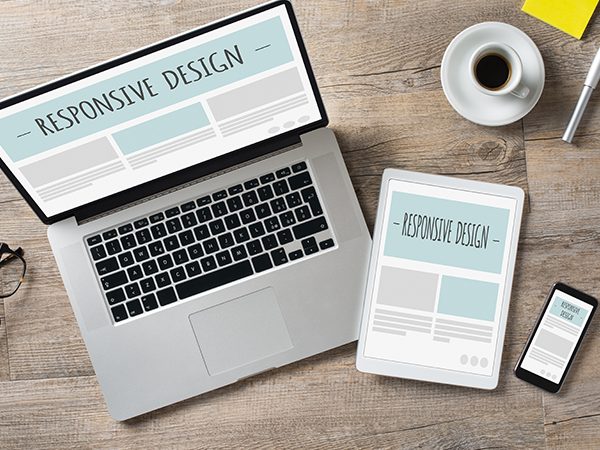
Most of your visitors are checking your site from their phones, not their desktops. If your site isn’t built to adjust automatically to different screen sizes, you’re going to lose those visitors fast. Nobody wants to pinch, zoom, or scroll sideways just to read your content.
A good responsive web design means your site looks great and functions smoothly for multiple screen sizes. That means:
- Flexible layouts that adapt to smaller screens.
- Scalable images and fonts so nothing looks cut off or oversized.
- Touch-friendly buttons that are easy to tap without hitting the wrong thing.
With responsive website design, you’re not just improving user experience. Google prioritizes mobile-friendly sites in search results, so a non-responsive design could be costing you traffic (and business).
The fix is simple: Choose a WordPress theme that’s mobile-first or work with a developer to make your current theme responsive. It’s one of the easiest ways to boost engagement and keep people from bouncing off your site.

Bad Calls to Action & Cluttered Layout
In short: A good CTA = You are controlling the user. But they can easily backfire if their wording or presentation is unconvincing, confusing, or unclear. Or, they are in the wrong place.
Generic calls-to-action like “Click Here” or “Read More” can leave users confused and without a clear sense of what to expect when clicking. Instead, try using an engaging title or description that compels readers to take action and take part. For example: “Book a consultation” or “Talk to an expert” will surely work better.
Here’s a catch:
- Use simple text
- Avoid long paragraphs
- Use white spaces for better visibility
Poor User Experience & Non-Optimized Images
Accessibility is about making sure everyone can use your website, including people with disabilities. If your site isn’t accessible, you’re not only excluding a portion of your audience but also risking compliance issues (yes, there are accessibility standards like WCAG that businesses are expected to meet).
Poor accessibility often shows up in things like:
- Tiny fonts that are hard to read.
- Low-contrast colours that make text blend into the background.
- Missing alt text on images (screen readers can’t describe what isn’t there).
- Buttons and links are too small to click comfortably.
Fixing accessibility is not as complicated as it sounds. Use clear, legible fonts, make sure your colours pass contrast checks, and always add descriptive alt text to images. Also, test your website with a screen reader or keyboard navigation. Here’s why a website is important for businesses.
Too Many Popups & Media Queries
Popups often get a bad rap for good reason. Yet when done well, pop-ups can be powerful marketing tools to engage visitors and convert them into customers. For example, if you are running an E-Commerce store, and a person is about to leave the website immediately. You can then make a custom pop-up to show any chances for them to get a discount.
Successful popups must be short, concise, and informative. A plugin with flexible display rules should also be chosen to control when and where pop-ups appear on a website. But, avoid showing popups immediately upon entry, as that could prove frustrating for visitors.
Begin Your Digital Success Story Today!
It’s time to bring your business out of the dark ages. All successful companies require a comprehensive digital marketing strategy to increase online branding and exposure. If you’re sitting on the sidelines, you’re losing money. Investing in your digital marketing platform promises substantial revenue increases for your business. We provide all clients with a commitment-free consultation to assess their current strategy.
Conclusion
The website design mistakes we just covered are all too common, but the good news is they’re easy to fix once you know what to look for. Test your site regularly on mobile devices, check your SEO health, and always think about the end user first. At the end of the day, it’s about keeping the user and search engines happy!
Your Website Deserves Better (And So Do You)
Be honest – when was the last time you looked at your website and thought, “Wow, this is really helping my business grow”? If the answer is “never” (or not recently), that’s where we come in. At Digital Engage, we build websites that are more than just eye candy. Let’s build one that actually works for you. Contact us now!
What Our Customers Say

Being a small business owner can be tough at times. It can be over whelming when trying to market your business on your own or even speaking to a advertising agency. This was not the case with these guys. They explained everything thoroughly and in terms me and my business partner could understand. We have already noticed a significant increase in sales and it has only been 2 months!
This is an awesome team to work with. They have incredible website design work & we have been working with them for the last couple of years and have the highest confidence in their team for web design & SEO work. I Have recommended them to several people.
We used Digital Engage to help get better rankings for our business. They have been doing an amazing job and we couldn’t be more satisfied with the results we have gotten so far. If you are looking to have SEO done for your business then you really need to give them a call.
They are very knowledgeable and devoted at what they do. They handle all my digital marketing needs reserving me time and energy for other activities. Nice service! Thanks.
Start Your Free Consultation
You’re halfway home with the hit of a button. Click below for expert advice on how we can help your business today!
Other Services

Search Engine Optimization
SEO is your online visibility booster! Get SEO for your business to enhance organic visibility, attract targeted traffic, and drive more leads and conversions.
Read More 
Paid Search
Invest in paid search and get more clients! Expand your brand by utilizing search engines like Google Ads to display ads to users searching for specific keywords.
Read More 
Social Media Advertising
Be in front of everybody through social media! Build your business with targeted campaigns to reach specific audiences on platforms like Facebook & Instagram.
Read More 
Web Design
Get the perfect website for your business! Communicate your brand's message through visually appealing, modern , functional, and user-friendly web designs.
Read More 
Why Choose Us
We drive results with proven processes but, more importantly, we treat everyone like a client, not an account.
Some of our Clients